 Pro Metadata
EXIF vs XMP vs IPTC: What's the Difference and Which One Matters for SEO?
Every image file contains three separate metadata formats — EXIF, XMP, and IPTC. Here's exactly what each stores, which fields Google reads for SEO, and how to use all three correctly.
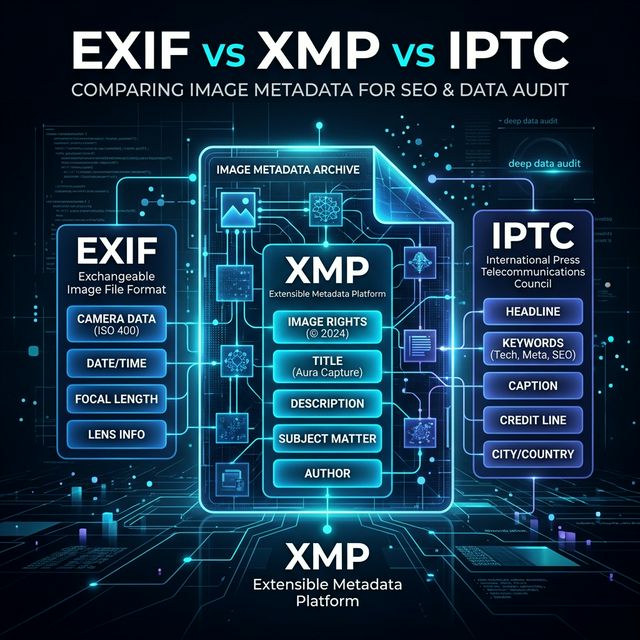
EXIF vs XMP vs IPTC: What's the Difference and Which One Matters for SEO?
Open any JPEG in a metadata viewer and you will find three separate layers of data — EXIF, XMP, and IPTC — each stored in a different part of the file, each written by different software, each serving a different purpose.
Most people who know about metadata know about EXIF — the GPS coordinates and camera settings. Fewer know about XMP and IPTC. And almost nobody knows which fields Google actually reads when ranking images.
This guide covers all three formats technically — what they store, how they're structured, where they live inside a file, and exactly which fields matter for SEO.
Where the metadata actually lives in an image file
A JPEG file is structured in segments, each identified by a marker. The three metadata formats occupy different segments:
JPEG File Structure
├── SOI marker (start of image)
├── APP0 segment — JFIF/JFIF extension data
├── APP1 segment — EXIF data (IFD0, ExifIFD, GPS IFD)
├── APP1 segment — XMP data (XML packet)
├── APP13 segment — IPTC data (photoshop IRB)
├── APP14 segment — Adobe data
├── DQT segment — quantization tables
├── SOF segment — frame header
├── DHT segment — huffman tables
├── SOS segment — start of scan
└── Image data (the actual pixels)
EXIF lives in APP1, XMP lives in a second APP1 segment (distinguished by namespace URI), and IPTC lives in APP13. They don't interfere with each other — they're independent data blocks coexisting in the same file.
PNG, WebP, TIFF and PDF handle metadata differently but all support some combination of these three formats. JPEG supports all three simultaneously.
EXIF — Exchangeable Image File Format
Created: 1995 by JEIDA (Japan Electronics and Information Technology Industries Association) Purpose: Store camera and capture settings Written by: Cameras, smartphones, scanning software Structure: Binary IFD (Image File Directory) tags
EXIF is structured as a hierarchy of IFDs (Image File Directories):
IFD0 (Main image data)
├── Make, Model, Software, DateTime
├── ImageDescription, Artist, Copyright
├── Orientation, XResolution, YResolution
└── ExifIFD pointer, GPS IFD pointer

ExifIFD (Camera-specific data)
├── ExposureTime, FNumber, ISO
├── DateTimeOriginal, DateTimeDigitized
├── ShutterSpeedValue, ApertureValue
├── FocalLength, Flash, WhiteBalance
└── LensMake, LensModel

GPS IFD (Location data)
├── GPSLatitudeRef, GPSLatitude
├── GPSLongitudeRef, GPSLongitude
├── GPSAltitudeRef, GPSAltitude
├── GPSTimeStamp, GPSDateStamp
└── GPSSpeed, GPSImgDirection
EXIF fields and their SEO relevance
Field                   SEO Relevance    Notes
─────────────────────────────────────────────────────────
ImageDescription        Low              Old field, rarely read
Artist                  None             Not indexed by Google
Make + Model            None             Device fingerprinting
DateTime                Low              Freshness signal
GPSLatitude/Longitude   Low-medium       Geographic relevance
ExposureTime, FNumber   None             Camera settings
EXIF's SEO impact is minimal. The ImageDescription field is a legacy single-language text field with a 255-character limit — predating modern search by decades. Google reads it but weights it far below XMP.
The GPS coordinates are a geographic signal but not a ranking factor in most contexts. They matter for location-based searches ("coffee shop near Eiffel Tower") but not for typical product or content image searches.
The EXIF privacy problem
GPS in EXIF is the significant concern. Every smartphone photo taken with location services enabled stores exact coordinates — typically accurate to 5 meters or less.
GPSLatitude : 48 deg 51' 30.12" N
GPSLongitude: 2 deg 17' 40.44" E
That maps to a specific address. If a photo is taken at home, it contains the home address. Use ProMetadata's metadata cleaner to strip GPS before sharing any photo publicly.
XMP — Extensible Metadata Platform
Created: 2001 by Adobe Systems Purpose: Store descriptive, rights, and administrative metadata Written by: Adobe products, professional DAMs, metadata tools Structure: XML embedded in the image file
XMP is stored as a UTF-8 encoded XML packet inside the image file. You can actually read it as plain text:
<?xpacket begin='' id='W5M0MpCehiHzreSzNTczkc9d'?>
<x:xmpmeta xmlns:x='adobe:ns:meta/'>
  <rdf:RDF xmlns:rdf='http://www.w3.org/1999/02/22-rdf-syntax-ns#'>
    <rdf:Description rdf:about=''
      xmlns:dc='http://purl.org/dc/elements/1.1/'
      xmlns:xmp='http://ns.adobe.com/xap/1.0/'
      xmlns:photoshop='http://ns.adobe.com/photoshop/1.0/'>

      <!-- Dublin Core namespace — primary SEO fields -->
      <dc:title>
        <rdf:Alt>
          <rdf:li xml:lang='x-default'>Men's Slim Brown Leather Bifold Wallet</rdf:li>
        </rdf:Alt>
      </dc:title>

      <dc:description>
        <rdf:Alt>
          <rdf:li xml:lang='x-default'>Handcrafted bifold wallet in full-grain brown leather. Holds 8 cards. Slim profile fits front pocket.</rdf:li>
        </rdf:Alt>
      </dc:description>

      <dc:subject>
        <rdf:Bag>
          <rdf:li>leather wallet</rdf:li>
          <rdf:li>bifold wallet</rdf:li>
          <rdf:li>mens wallet</rdf:li>
          <rdf:li>slim wallet</rdf:li>
          <rdf:li>brown leather</rdf:li>
        </rdf:Bag>
      </dc:subject>

      <dc:creator>
        <rdf:Seq>
          <rdf:li>Your Brand</rdf:li>
        </rdf:Seq>
      </dc:creator>

      <dc:rights>
        <rdf:Alt>
          <rdf:li xml:lang='x-default'>© 2026 Your Brand. All rights reserved.</rdf:li>
        </rdf:Alt>
      </dc:rights>

      <!-- XMP Basic namespace -->
      <xmp:CreateDate>2026-03-21T09:00:00</xmp:CreateDate>
      <xmp:ModifyDate>2026-03-21T09:00:00</xmp:ModifyDate>
      <xmp:CreatorTool>ProMetadata</xmp:CreatorTool>

      <!-- Photoshop namespace — additional SEO signals -->
      <photoshop:Headline>Men's Leather Bifold Wallet</photoshop:Headline>
      <photoshop:Caption>Slim brown leather wallet handcrafted in Italy.</photoshop:Caption>

    </rdf:Description>
  </rdf:RDF>
</x:xmpmeta>
<?xpacket end='w'?>
XMP fields and their SEO relevance
Namespace    Field                SEO Relevance    Notes
──────────────────────────────────────────────────────────────
dc:          title                Very high        Primary image name
dc:          description          Very high        Keyword-rich description
dc:          subject              Very high        Keyword array — most important
dc:          creator              Low              Author attribution
dc:          rights               None (SEO)       Legal, not ranking
dc:          format               None             MIME type
xmp:         CreateDate           Low              Freshness signal
xmp:         ModifyDate           Low              Update signal
xmp:         CreatorTool          None             Software used
photoshop:   Headline             Medium           Alternate title
photoshop:   Caption              Medium           Description fallback
XMP is multilingual — notice the xml:lang='x-default' attribute. You can store the same field in multiple languages inside one file, which matters for multilingual sites.
XMP is also extensible — new namespaces can be defined, which is why it's used for everything from creative rights management (XMP Rights) to color management (XMP Camera Raw settings).
IPTC — International Press Telecommunications Council
Created: 1979, IIM standard; modernized 1994; IPTC Core 2004 Purpose: Editorial and press photography metadata Written by: News photo systems, professional DAMs, image editing software Structure: Binary key-value pairs in Photoshop IRB format
IPTC predates the web. It was created to standardize how news photos were transmitted between agencies. Despite its age, it carries significant weight in Google's image indexing because Google indexes enormous volumes of news and editorial content that uses IPTC extensively.
IPTC IIM Fields (the old standard)
├── 2:05  Object Name (title)
├── 2:10  Urgency
├── 2:15  Category
├── 2:20  Supplemental Category
├── 2:25  Keywords (repeatable)
├── 2:40  Special Instructions
├── 2:55  Date Created
├── 2:80  Byline (creator)
├── 2:85  Byline Title
├── 2:90  City
├── 2:92  Sublocation
├── 2:95  Province-State
├── 2:100 Country-Primary Location Code
├── 2:101 Country-Primary Location Name
├── 2:103 Original Transmission Reference
├── 2:105 Headline
├── 2:110 Credit
├── 2:115 Source
├── 2:116 Copyright Notice
├── 2:120 Caption/Abstract
└── 2:122 Writer/Editor
IPTC fields and their SEO relevance
IPTC Field          SEO Relevance    Notes
────────────────────────────────────────────────────
Caption/Abstract    High             Primary description — high weight
Keywords            High             Comma-separated keyword list
Headline            Medium           Short title
Object Name         Medium           Formal title
Category            Low-medium       Broad topic classification
City/Country        Low-medium       Geographic signal
Credit              None (SEO)       Attribution
Copyright Notice    None (SEO)       Legal only
The Caption/Abstract field is IPTC's most important for SEO. It's a freeform text field designed for editorial descriptions — typically 500-2000 characters. Google treats it as a description source similar to XMP description.
IPTC Keywords is a repeatable field — each keyword is stored as a separate record:
IPTC:Keywords: leather wallet
IPTC:Keywords: bifold wallet
IPTC:Keywords: mens wallet
IPTC:Keywords: slim wallet
Unlike XMP subject which is an XML array, IPTC keywords are individual tagged values. Most tools display and export them as a comma-separated list.
Where fields overlap and which wins
When the same conceptual field exists in multiple formats, Google has to decide which to prefer. Based on observed behavior:
Concept      XMP field           IPTC field          Preferred by Google
─────────────────────────────────────────────────────────────────────────
Title        dc:title            Headline            XMP dc:title
Keywords     dc:subject          Keywords            XMP dc:subject
Description  dc:description      Caption/Abstract    XMP dc:description
Creator      dc:creator          Byline              XMP dc:creator
Copyright    dc:rights           Copyright Notice    dc:rights
Location     (photoshop fields)  City/Country        IPTC location fields
XMP wins for content fields. IPTC wins for location fields. When both exist and conflict, Google generally prioritizes XMP for modern content — but having consistent values across both formats is better than relying on one.
The practical recommendation: inject the same keyword and description data into both XMP and IPTC. Consistency across formats reinforces the signal.
How to read all three formats from any image
Command line — exiftool
# Read all three formats in organized groups
exiftool -EXIF:all -XMP:all -IPTC:all your-image.jpg

# Read only the SEO-relevant fields
exiftool \
  -EXIF:ImageDescription \
  -XMP:Title \
  -XMP:Description \
  -XMP:Subject \
  -IPTC:Headline \
  -IPTC:Caption-Abstract \
  -IPTC:Keywords \
  your-image.jpg

# Export all metadata from a directory to CSV
exiftool -csv -XMP:all -IPTC:all ./images/ > audit.csv
Node.js — exiftool-vendored
import { exiftool } from 'exiftool-vendored'

async function readAllMetadata(filePath) {
  const tags = await exiftool.read(filePath)

  return {
    exif: {
      description: tags.ImageDescription,
      gpsLat: tags.GPSLatitude,
      gpsLon: tags.GPSLongitude,
      dateTaken: tags.DateTimeOriginal,
      camera: `${tags.Make} ${tags.Model}`,
    },
    xmp: {
      title: tags.Title,
      description: tags.Description,
      keywords: tags.Subject,      // array
      creator: tags.Creator,
      rights: tags.Rights,
    },
    iptc: {
      headline: tags.Headline,
      caption: tags['Caption-Abstract'],
      keywords: tags.Keywords,     // string or array
      city: tags.City,
      country: tags.Country,
    }
  }
}

const metadata = await readAllMetadata('./product.jpg')
console.log(metadata)
await exiftool.end()
Browser — using ProMetadata
Upload any image to prometadata.com/extract. It reads all three formats and displays them in organized sections — EXIF, XMP, and IPTC — with each field labeled. No installation, no login.
Writing all three formats simultaneously
For maximum SEO coverage, inject all three:
import { exiftool } from 'exiftool-vendored'

async function injectAllFormats(filePath, data) {
  await exiftool.write(filePath, {
    // EXIF
    'EXIF:ImageDescription': data.description,

    // XMP — primary SEO signals
    'XMP:Title': data.title,
    'XMP:Description': data.description,
    'XMP:Subject': data.keywords,     // array
    'XMP:Creator': data.author,
    'XMP:Rights': data.copyright,
    'Photoshop:Headline': data.title,

    // IPTC — secondary signals
    'IPTC:Headline': data.title,
    'IPTC:Caption-Abstract': data.description,
    'IPTC:Keywords': data.keywords,   // array
    'IPTC:By-line': data.author,
    'IPTC:CopyrightNotice': data.copyright,
  }, ['-overwrite_original'])

  await exiftool.end()
}

await injectAllFormats('./product.jpg', {
  title: "Men's Slim Brown Leather Bifold Wallet",
  description: "Handcrafted bifold wallet in full-grain brown leather. 8 card slots. Slim profile.",
  keywords: ["leather wallet", "bifold wallet", "mens wallet", "slim wallet"],
  author: "Your Brand",
  copyright: "© 2026 Your Brand"
})
For bulk injection across hundreds of files without code, use ProMetadata's bulk optimizer.
Format support by file type
Not every format works in every file type:
Format    JPG   PNG   WebP   TIFF   PDF   MP4   MP3
──────────────────────────────────────────────────────
EXIF       ✓     ✓*    ✓*     ✓      ✗     ✗     ✗
XMP        ✓     ✓     ✓      ✓      ✓     ✓     ✓
IPTC       ✓     ✗     ✗      ✓      ✗     ✗     ✗

* Limited EXIF support
XMP is the most universal format — it works across images, PDFs, and video files. For non-JPEG files like WebP and PDF, XMP is the only option for descriptive metadata.
This is another reason XMP is the primary format to focus on for web SEO — it's the only one that works consistently across all modern image formats.
Quick reference — what to inject for SEO
Minimum (high impact, low effort):
  XMP:Title       → descriptive name matching search query
  XMP:Subject     → 5-10 relevant keywords as array
  Filename        → rename to match primary keyword

Standard (recommended for all sites):
  XMP:Title       → primary keyword phrase
  XMP:Description → 1-2 sentences with secondary keywords
  XMP:Subject     → 5-10 keyword array
  XMP:Rights      → copyright string
  IPTC:Headline   → matches XMP:Title
  IPTC:Caption    → matches XMP:Description
  IPTC:Keywords   → matches XMP:Subject

Complete (ecommerce, news, high-traffic sites):
  All of the above +
  IPTC:City/Country  → for location-relevant images
  XMP:Creator        → author attribution
  ImageObject schema → structured data on page
  Image sitemap      → submitted to GSC
Use ProMetadata's extract tool to verify what's already embedded before adding anything — and ProMetadata's inject tool to add XMP and IPTC fields without writing code.
Free tool
Try it yourself — no login required
View, inject, or remove metadata from your images and PDFs free. Works on any browser.
Launch free tool →Frequently asked questions
What is the difference between EXIF, XMP and IPTC?
EXIF stores technical camera data (GPS, shutter speed, device model). XMP stores descriptive data (title, keywords, copyright — best for SEO). IPTC stores editorial data (captions, categories, credit lines — used in press photography). All three can exist simultaneously inside the same image file.
Which metadata format is best for SEO?
XMP is the most important for SEO. Google reads XMP dc:title, dc:description and dc:subject (keywords) when indexing images for Google Image Search. IPTC keywords and caption are also read. EXIF has minimal direct SEO impact.
Can an image have EXIF, XMP and IPTC at the same time?
Yes. All three formats coexist inside the same image file in separate data blocks. A smartphone photo typically has EXIF written automatically by the camera. XMP and IPTC can be added separately using a metadata tool like ProMetadata.
How do I view EXIF, XMP and IPTC data in an image?
Upload your image to ProMetadata's free metadata viewer at prometadata.com/extract. It reads and displays all three formats — EXIF, XMP and IPTC — in a single view. No login required.
What is XMP metadata?
XMP (Extensible Metadata Platform) is a metadata standard created by Adobe in 2001. It stores descriptive information about files — including title, keywords, description, creator and copyright. It is embedded inside image files as an XML packet and is the most SEO-relevant metadata format because Google reads its fields when indexing images.
More from ProMetadata
← Back to all articles